Category: AWS SCS-C03

  • Note: This is the fourth post in my AWS SCS-C03 series. You can see the rest of the posts in the series using the link above.

    • AWS Config
      • Records configuration changes over time on AWS resources.
      • It does not actively prevent changes from occurring.
      • When changes do occur, you can use Amazon SNS, EventBridge, and Lambda to notify or run functions in response.
      • All changes are tracked and saved to an S3 bucket.

    • Service Catalog
      • Allows your organisation to create and manage catalogs of IT services approved for AWS (incl. servers, VM images1, software, etc).
      • Using Service Catalog can restrict AWS resources being created in specific regions, prevent specific EC2 instance types being provisioned, and can prevent certain AWS resources being available to users.
    • Resource Access Manager (RAM)
      • Allows for secure sharing of resources across AWS accounts within your organisation or organisational units. You can create one resource and then share it with other AWS accounts.
      • Resources can also be shared with other AWS accounts, even if the account is not part of an organisation.
      • This helps reduce your operational overhead2, improve security and consistency3, and provides resource visibility4.

    Thanks for reading!

    -J

    More reading:

    1. Virtual Machine Images ↩︎
    2. Operational overhead is reduced as you don’t need to duplicate resources ↩︎
    3. When resources are shared using AWS RAM, it is managed using a single set of policies and permissions ↩︎
    4. AWS RAM integrates with Amazon CloudWatch and CloudTrail for comprehensive visibility into shared resources and accounts ↩︎
  • Note: This is the third post in my AWS SCS-C03 series. You can see the rest of the posts in the series using the link above.

    • Control Tower
      • Allows for quick, easy setup of a multi-account environment in AWS (this is known as the landing zone)
        • To do this, it makes use of other AWS services such as Organisations, IAM Identity Centre, CloudFormation, AWS Config, and more.
      • Guard Rails / Controls can be used to mandate rules and standards across all accounts
        • These controls are:
          • Elective – you can choose these fully. Elective controls can either detect behaviour for auditing, or prevent it.
          • Strongly recommended – these can be deactivated, but are recommended due to being best practice for Well-Architected multi-account environments
          • Mandatory – these cannot be disabled as they protect AWS Control Tower resources
        • Preventive guardrails, in a similar vein to SCPs, do not apply to the Management account.
      • Account Factory automates and standardises the creation of new accounts
      • Dashboard provides oversight of the landing zone to the cloud admins.
      • Creates two OUs (Organisation Units) – one called the Security OU, and one called the Sandbox OU (optional).
        • Sandbox OU and other registered OUs contain enrolled accounts.
        • Security OU contains both the Log Archive and Audit accounts.
        • If you like, you can create more OUs.
      • IAM Identity Centre allows for single sign-on (SSO) and ID Federation.

    Thanks for reading!

    -J

    More reading:

  • Note: This is the second post in my AWS SCS-C03 series. You can see the rest of the posts in the series using the link above.

    • AWS Organisations allows you to centrally manage and govern an AWS environment.
      • To create an Organisation, you’ll need to create an Organisation using your AWS account (which will become the Management account) and invite other AWS accounts (Member accounts) you’d like to add to your Organisation.
      • Organisational Units (OUs) can be created to further simplify Organisations.
      • Policies can be assigned to OUs to administer what permissions the members of the Organisation have.
      • Once your Organisation has been created, a feature called Consolidated Billing kicks in. Consolidated Billing means you receive a single monthly bill for all the Member accounts within the overall Organisation, which simplifies costs.
    • Service Control Policies (SCPs) allow you to centrally restrict the maximum available permissions allowed by IAM roles and users in your member accounts (Member accounts only – this does not apply to the Management account).
      • SCPs do not add or give permissions (they can only restrict them).
      • For example: if an IAM user within an organisation is given full access to S3 using an IAM policy, but an overarching SCP restricts access to S3, then that IAM user will have their access to S3 restricted.
      • SCPs do not affect service-linked roles. Service-linked roles are IAM roles that enable an AWS service to perform actions on your behalf. This can’t be restricted by an SCP.

    Thanks for reading!

    -J

    More reading:

  • Note: This is the first post in my AWS SCS-C03 series. You can see the rest of the posts in the series using the link above.

    • An AWS account is a container for AWS identities (users) and resources (ex. EC2 instances, S3 buckets, etc).
    • The first identity created in an AWS account is the root user / root account.
      • The root account should only be used for billing reasons, closing the AWS account down, and changing account settings. For any other use, a separate admin or default user account (known as an IAM user account) should be created.
      • This allows for separation of duties and reduces attack spread in case of account infiltration (since a hacker may gain access to the admin account or a default user account, but not the root account).
      • Using multi-factor authentication (MFA) can help improve the security of the root account.
      • It is of utmost importance to protect the root user account because access to this gives an attacker access to every service available in AWS.

    • IAM users can be added to groups and assigned permissions using IAM policies. Permissions can be added to groups, or directly to users themselves. For time efficiency, it’s better to add IAM users to groups, and then add permissions to groups.
      • IAM Users are intended for use by humans only.
      • IAM Roles can be assigned to external identities and AWS services. This allows them to gain access to your account and perform tasks.
      • IAM Access Keys can be used to access AWS services using a command-line interface (CLI). These are long-term keys and can be rotated in case of a leak. These keys can be created, deleted, and also made active, or inactive. Access keys are made up of an Access Key ID, and a Secret Access Key – you’ll need both to connect via a CLI.
      • Using multi-factor authentication (MFA) can help improve the security of an IAM user and is strongly recommended for all users.

    • Authentication vs. Authorisation:
      • Authentication is about proving who you are.
      • Authorisation is about checking you have the permissions to access or do something.

    Thanks for reading!

    -J

    More reading:

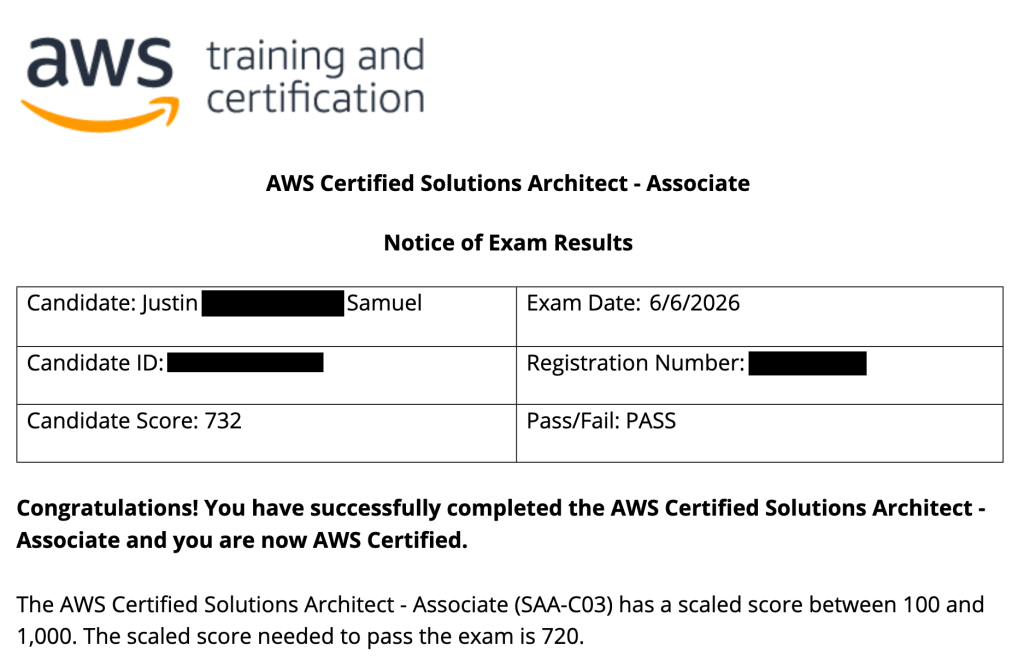
  • So far I’ve achieved two certifications: CompTIA Security+ and most recently, AWS Solutions Architect.

    My Notice of Exam Results / Pass Certificate

    Now that I’ve completed those two certificates, I still have one more I want to get and that’s the one in the title of this blog post: the AWS Security Specialty certification.

    I’m hoping writing here will keep me accountable and also double as a place for me to produce short write-ups and notes. Maybe it’ll be helpful for you as well.

    Alongside studying AWS SCS-C03 – the current version of the certification – I’ll also be building projects to help with the practical side of learning such a theory-heavy exam.

    I originally wanted to study Maarek’s course, but felt it would be better to study Cantrill’s as I wanted a more in-depth understanding of the AWS services and to learn more about how to go about building secure architecture in real situations. I think Maarek’s course would be good enough to pass with, but I’m worried it will become more of a test of how much I can memorise, rather than how much I can understand.

    The way I see it, if I can understand how a system or service works, I can fill in my potential knowledge gaps during an exam a lot better through deeply understanding the systems beforehand and recalling how they work rather than just memorising facts and bullet points alone.

    As I begin to write the posts, I’ll update them below:

    • AWS SCS-C03 1: IAM (work-in-progress)
    • More to come

    Thanks for reading

    -J